First, what you should know: we run our shop on Taskrol, and the owner of Cactus Appliance is the person who founded Taskrol. He started it after years of running this shop on other software, because of the problems described below. So this is not a neutral review. It is one repair shop’s account of what we used, why we left, and what changed.
What a repair call looks like in our shop
Most of our work is appliance repair, and three things shape our day.
The machine. The job is not really the address. It is the refrigerator at that address: its brand, model and serial number.
The part. A part is needed on almost every call. If it is on the van or in our stock, the repair is finished the same day. Otherwise the job stays open until the part arrives.
The second visit. So many of our jobs are two visits. The technician follows his own part, and someone calls the customer to set the return.
General field-service software handles a calendar well. It strains here, because it is built around a list of jobs, not around machines with model numbers.
What we ran before
Workiz, at the start. Our owner worked alone then. Workiz is built around a team and a phone system, and for one technician it cost more than the shop could justify; we did not find a plan sized for a single person. So we moved.
Housecall Pro, for years. The good first: nothing got lost, and jobs were tracked. It is made for home-service businesses of every kind, and it has a lot of tools for bringing customers in. What wore on us was specific to repair work.
- The job and customer records we worked in every day had no field for the appliance’s make, model or serial, so our technicians photographed the model sticker on every call.
- We could not copy a customer’s phone number from the job. To call from a personal phone you opened the customer, went into editing and copied it there, every time. The address could not be copied either; it only opened a map.
- Creating a job took several screens, and reports lived in several places.
That is from the years we used it, and it may have changed since. It simply was not built for our kind of business.
What we run now, and which parts of the day changed
We run on Taskrol. It costs us less, and the day has fewer taps in it. This is what changed.
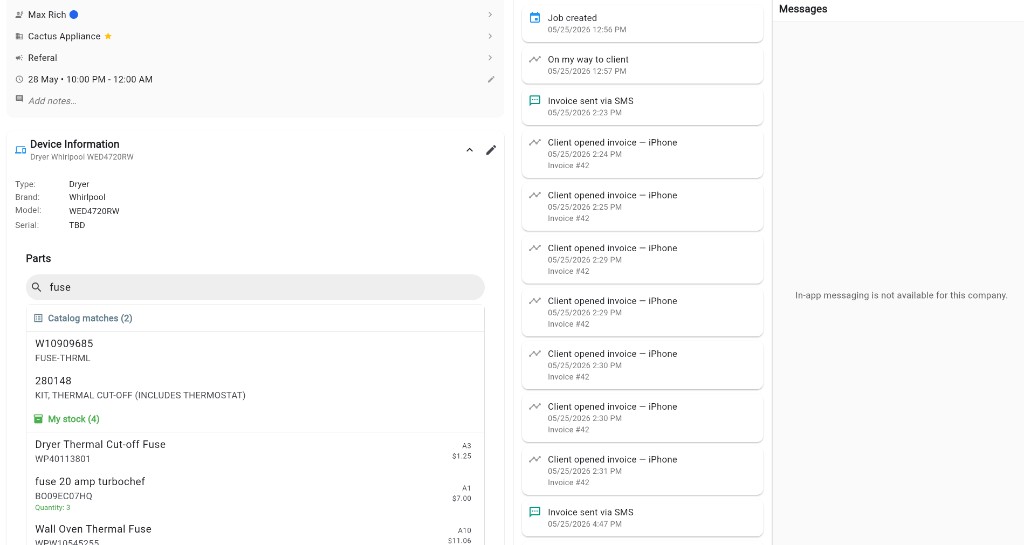
- At the machine. The phone camera reads the model and serial off the data plate, and the appliance is saved on the job with a photo of the plate, not left in a technician’s camera roll. The customer’s record lists their appliances and every past job.
- Finding the part. We used to look up exploded diagrams on a parts site in a browser. Now the diagrams for the model open from the job, and the parts search runs against the model number, inside the app.
- Not buying it twice. The same search shows what is already on a van, down to the cell, and in our warehouse. One call we remember: a Samsung RFG237AARS with the fresh-food side not cooling. The fix was part DA97-11772B, and the search showed one sitting in our own warehouse. Nobody bought a second.
- At the door. The customer signs the diagnostic fee before we open the machine. The estimate and invoice are one document with up to three options. Until one is approved, only the service call is due, and the signed option becomes the invoice.
- The small things. Press and hold the phone number or address on a job and it copies. A new customer and their job are created on one screen. A warranty return is booked from the finished job in one tap and stays linked to it.
- The day on a map. The visits are pinned and numbered in order, so the route is planned on the map before the first call.
On cost: Solo, for one technician, is free and stays free. Basic is $29 a month with one user, Pro is $129 with three, and each additional user is $29. Every new account gets seven days of Pro with no card, then stays on free Solo unless the owner subscribes.
If you are choosing software for an appliance repair shop
Ask any vendor for these in the demo, on a real job.
- Where does the appliance live? Enter a make, model and serial on a job, then open that customer again. Is the machine there, or only in a note?
- Do I already own this part? Add a part to a job and ask whether one is on a van or a shelf. If the answer takes more than one screen, you have learned something.
- What happens to a job waiting on a part? Where does it sit, and how does the return visit get back on the schedule?
- Can I see two signatures on one job? One authorizing the diagnostic before work starts, one approving the repair.
- What is the whole bill for my size? Count every seat, the dispatcher’s too, and check which tier holds inventory and reports. If you work alone, ask whether there is a plan for one technician.
Taskrol keeps its own comparison of appliance repair software if you want to see the field side by side.