
By the Cactus Appliance team · Updated October 14, 2026 · Vendor pages checked September 2026
A dishwasher call comes in at 8:15. The technician reads the model off the door sticker, finds the drain pump has failed, and whether the job closes today comes down to one question: is a pump for that model already on a van? That is what we judged the software on.
We are Cactus Appliance in Irvine, California, repairing home appliances and commercial kitchen equipment across Orange County. The shop has run on Workiz, then Housecall Pro for years, and today on Taskrol.
Disclosure. The owner of Cactus Appliance founded Taskrol. Taskrol is our #1 pick below, and that is why we are telling you first. We have run three of the eight ourselves: Workiz, Housecall Pro and Taskrol. The other five are judged from their own websites, read in September 2026, and we say so rather than guess.
What appliance repair software does for a shop
It takes the call, puts the job on a technician’s day, keeps the appliance’s make, model and serial, finds the part for that model, tells you whether you already own one, and turns the signed estimate into an invoice and a payment. Every tool here does the first two. The rest is where they part ways, and it is what we ranked on.
Quick picks
- Best overall for an appliance repair shop: Taskrol (our product)
- Best for a QuickBooks or Xero sync: Orderry
- Best for home-warranty work in a cloud app: ApplianceOps
- Best for a multi-trade business that needs more calls: Housecall Pro
- Best for marketplace leads and the phone: Workiz
- Best customer experience for a small multi-trade team: Jobber
- Best for warranty-network dispatch: Rossware ServiceDesk
- Best for ten or more technicians: ServiceTitan
How we picked the best appliance repair software for 2026
We ranked on five things that matter on a repair call and that a calendar-first tool tends to skip.
- The appliance has a record: brand, model and serial on the job and under the customer.
- Parts lookup by model number, not by scrolling a catalog.
- Your own stock is in the same answer, before another part is bought.
- The two-visit repair stays in sight while the part is on order.
- The whole monthly bill: what a shop our size pays once every seat is counted, on the tier that actually includes the parts tools.
Appliance repair software compared
| Software | Best for | Appliance record | Parts by model | Your own stock | Free plan or trial | Pricing shape |
|---|---|---|---|---|---|---|
| Taskrol | Appliance repair, solo to a team | Type, brand, model, serial on every job | From the model on the job; diagrams | Van cells and warehouse, every plan | Free Solo plan; 7 days of Pro, no card | Solo $0; Basic $29/mo; Pro $129/mo; extra users $29/mo |
| Orderry | QuickBooks or Xero sync | History per customer | Database by brand and model | Truck and warehouse, low-stock alerts | 7-day trial, no card | Four flat tiers, seats included |
| ApplianceOps | Home-warranty shops, 1–5 people | Make, model, serial, history per machine | Error code → OEM part numbers | Stock ledger, POs, Parts-to-Order list | 14-day trial, no card | Base plus per seat |
| Housecall Pro | Multi-trade, marketing | Property Profiles (opt-in app) | Not published | Price book; no stock described | 14-day trial, no card | Three tiers plus add-ons |
| Workiz | Marketplace leads, phone | Not described | Not published | Top tier only | 7-day trial | Three feature tiers plus Genius add-ons |
| Jobber | Small multi-trade teams | Custom fields, select plans | Not published | None described | 14-day trial of Grow | Four tiers, extra seats billed |
| Rossware ServiceDesk | Warranty-network dispatch | Job history; parts by machine type and make | By machine type and make | Minimums per truck and stock room | Not published | Flat core, per-user tech app, add-ons |
| ServiceTitan | 10+ technicians | Equipment records, job histories | Not published | Trucks and warehouses, POs, barcode | Demo, no trial | Per technician, by quote |
1. Taskrol — Best overall for appliance repair shops
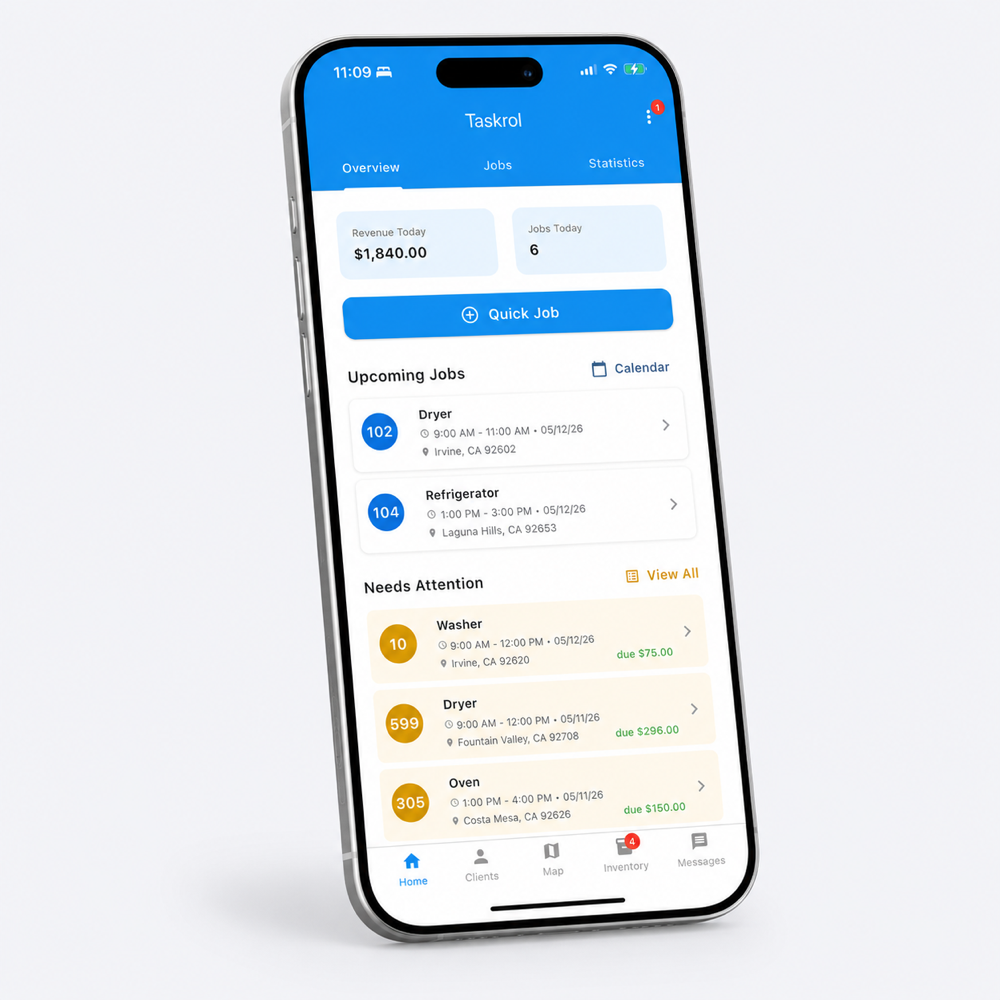
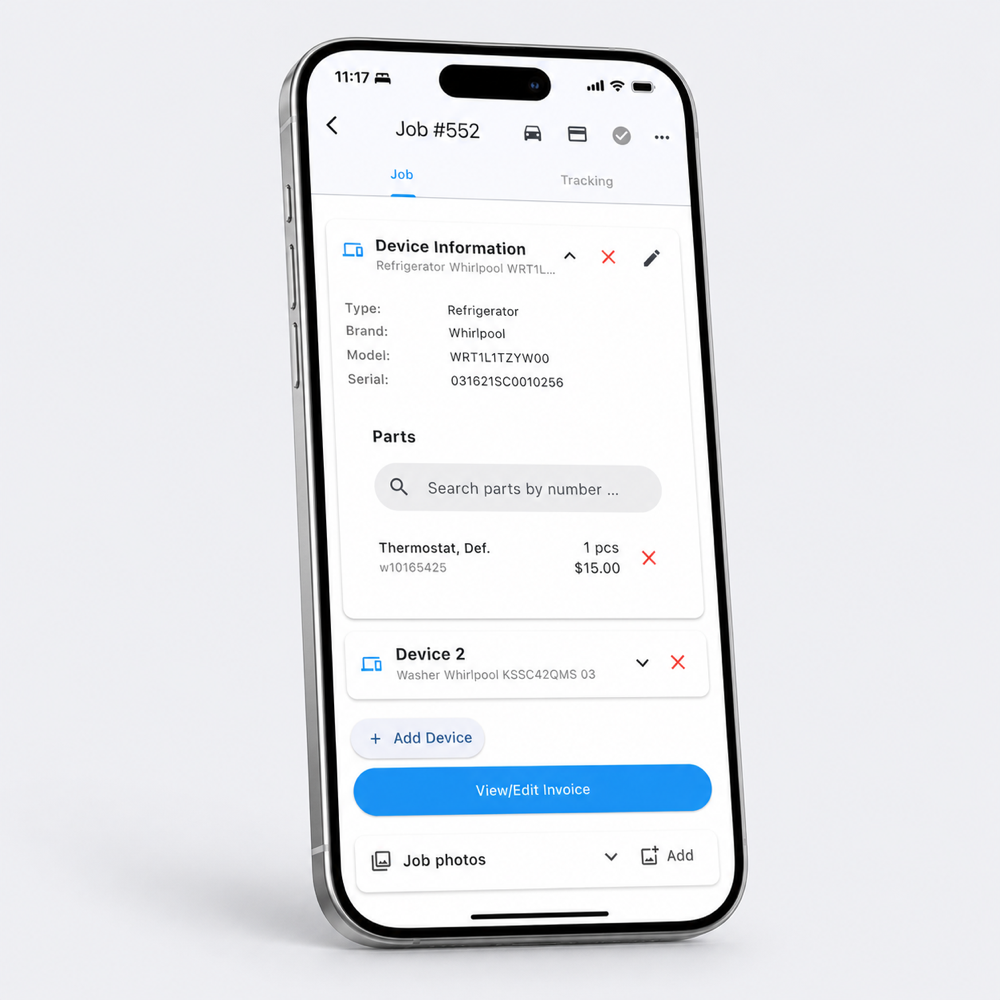
Taskrol is built for the repair visit, and it is the software our shop runs on every day. The technician photographs the data plate and the appliance goes on the job by type, brand, model and serial. The parts search starts from that model number in the Encompass catalog, and the hits come back with our own inventory beside them: which van, which cell. It is our product; that is the reason to read this entry with a skeptical eye, and the parts flow just described is the reason it is first.
Best for: an appliance repair shop, from one technician to a team, where a part is needed on most calls.
Key features:
- Appliance on every job, read off the plate by the camera; open the customer and every machine they own is there with its job history.
- Parts lookup by model number, with exploded diagrams on every plan and van and warehouse stock by cell in the same result.
- Diagnostic fee first, then up to three estimate options; the option the customer signs turns into the invoice, paid in the app or by Tap to Pay on iPhone.
- The job that waits on a part stays open while the part is on order, then sits in Ready to install until the return visit is dragged onto a technician’s day.
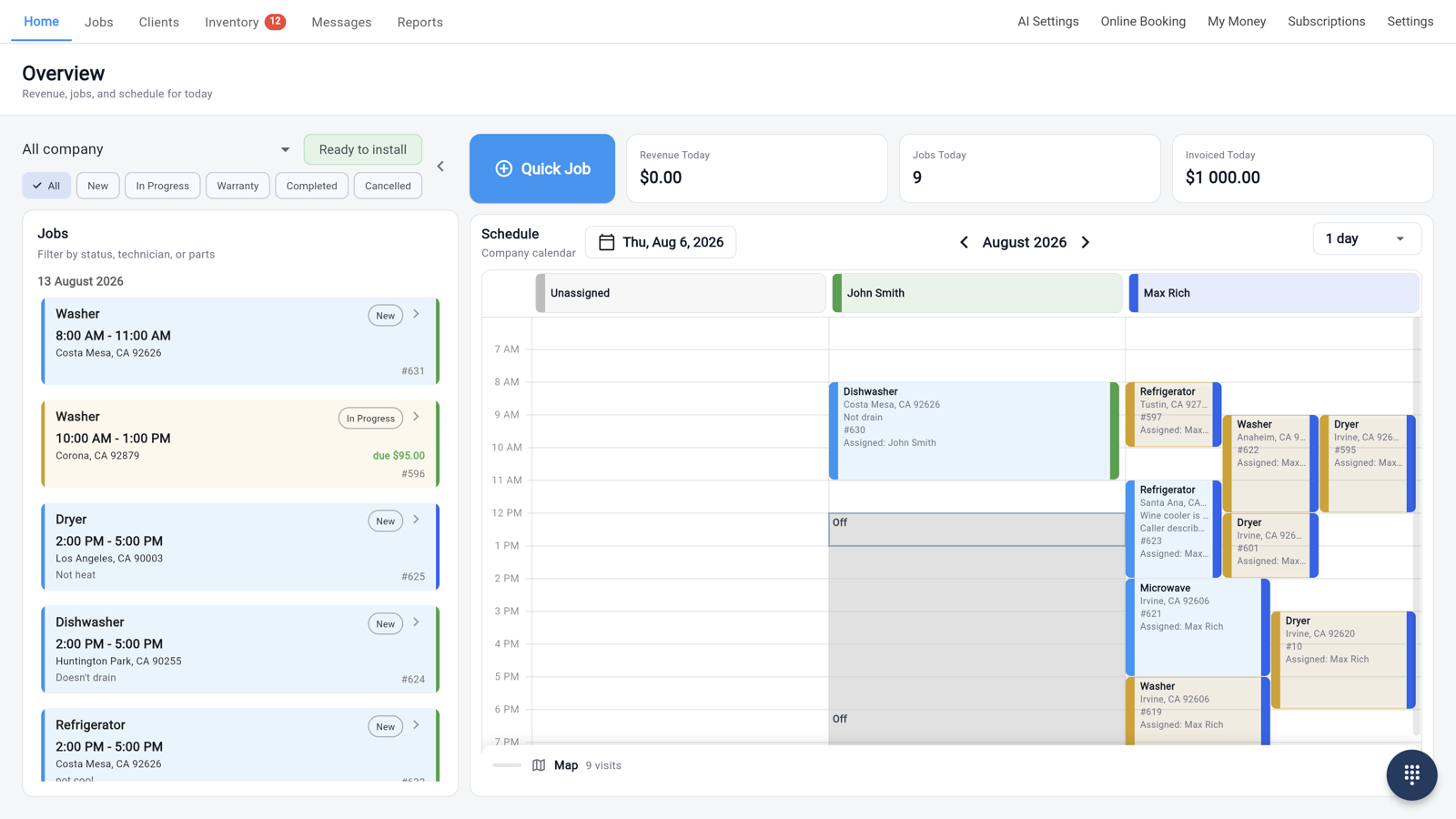
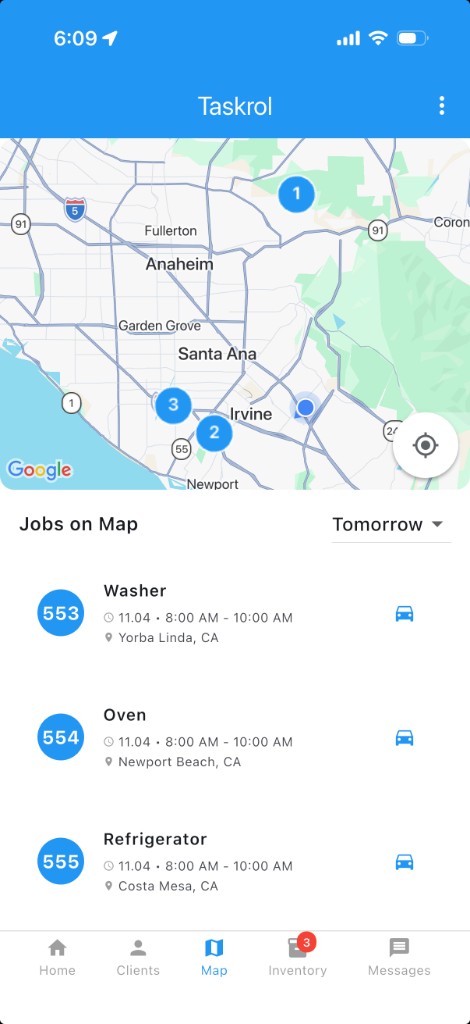
- Dispatch board and map, On My Way texts, and a one-tap warranty callback that keeps the original job number.
Pros: model, fitting part and own stock in one flow on the job; Solo is a free plan, not a trial, with stock and diagrams on it; published prices; the diagnostic fee and the repair approval are two separate signatures on one job.
What to know: built for appliance and equipment repair; web, iPhone and Android; Housecall Pro, Workiz and Markate exports import directly in the web app, and support migrates Jobber and other systems; a business phone line and an AI Agent for missed calls can be added on any plan.
Pricing: Solo $0 for one technician. Basic $29/month with one user. Pro $129/month with three users and shared stock. Extra users $29/month. Every new account gets 7 days of Pro free, no card. It is our pick, and Solo means you can put a real week of calls through it before paying anyone anything. taskrol.com
2. Orderry — Best for a QuickBooks or Xero sync
Orderry’s appliance repair page lists appliance history per customer, a parts database by brand and model, and stock held by truck and warehouse. Of everything here, its feature list overlaps most with what we use day to day, so if you demo Taskrol, demo this one the same week.
Best for: an appliance shop whose bookkeeper lives in QuickBooks or Xero.
Key features:
- Two-way sync with QuickBooks and Xero; open API and Zapier.
- Truck and warehouse stock with low-stock alerts and auto-reorder.
- Warranty tracking per appliance, barcode scanning and parts tracked per job.
Pros: a readable pricing shape; seven-day trial, no card; web, iOS and Android.
Cons: its page marks route optimization and real-time technician tracking “coming soon,” so ask for a date; and it does not spell out whether typing the model number filters the parts list, which is the thing to test in the demo.
Pricing: four flat tiers from Hobby to Enterprise, each with employee seats built in and a monthly charge for more. orderry.com
3. ApplianceOps — Best for home-warranty work in a cloud app
ApplianceOps was written by a working technician, and its pages are aimed squarely at the small shop: one person starting out, up to a store with five on staff and a parts counter. Dispatch emails from AHS, First American, Choice and ServicePower become work orders, billed apart from the customer. Read this one if warranty claims fill your week.
Best for: a one-to-five-person shop with home-warranty revenue and technicians on Android.
Key features:
- Home-warranty split billing from parsed dispatch emails.
- Full offline work and AI error-code diagnosis that returns OEM part numbers.
- One invoice block per machine, priced by type (residential, commercial, sealed-system, LP) with that machine’s service history.
Pros: every feature on every plan; route optimization; 14-day trial, no card.
Cons: technicians on iPhones run it in the browser, since the native app is Android only; the QuickBooks Online sync runs once a night rather than live.
Pricing: one base fee plus a charge per seat, which stops once a shop reaches five people. applianceops.pro
4. Housecall Pro — Best for a multi-trade business that needs more calls
Housecall Pro is the one competitor here we can judge from our own years on it. It kept our calendar straight and no job fell through the cracks. It is written for every home-service trade at once, and most of what it sells is aimed at getting the phone to ring: booking, reminders, reviews, campaigns.
Best for: a business running several trades where filling the calendar comes first.
Key features:
- Filling the calendar: review requests, email and text campaigns, reminders, and booking from your website.
- Property Profiles, an opt-in app holding make, model and serial per address.
- Instapay deposits, a published card-processing rate and a website product.
Pros: 14-day trial, no card; dispatch to the closest technician; QuickBooks sync; web, iOS and Android.
Cons: Essentials and Max come with a fixed number of seats and bill the rest monthly, so the office dispatcher is a seat too; CSR AI, Voice, Campaigns, Payroll and GPS are separate add-ons; and nothing in the Property Profiles documentation ties the appliance record to parts or inventory.
What we ran into: in the screens our technicians used all day there was nowhere to type a make, model or serial, so every call ended with a sticker photo in somebody’s camera roll. A customer’s number could not be copied from the job, only from deep in the edit screen, and the address only opened a map. That was our experience over several years, and their app may have changed since.
Pricing: three tiers, each with seats built in and the rest billed monthly, plus a long add-on list. housecallpro.com
5. Workiz — Best for marketplace leads and the phone
Workiz sells the front of the business: a phone system with calls, texts and email in one place, and lead feeds from Angi, Thumbtack and Google’s Local Services Ads, which its appliance page describes as fully integrated. Our owner used it in the shop’s one-man days, and the bill was sized for a crew with a phone system, not for a single technician; we found no plan that fit one person then, and their plans may have changed since.
Best for: a shop whose jobs come from the marketplaces and wants the phone inside the CRM.
Key features:
- Genius AI Answering that books callers around the clock.
- Purchase-order tracking for back-ordered parts; Good, Better, Best proposals.
- QuickBooks sync on every tier, custom reports from Pro.
Pros: Angi and Thumbtack wired in as lead sources; inventory with low-stock flags and purchase orders exist in the product; 120,000+ pros by its own count.
Cons: make, model and serial appear nowhere on its appliance page; inventory and purchase orders are reserved for the Ultimate tier; and a seven-day trial ends before most two-visit repairs do.
Pricing: Standard, Pro and Ultimate, each unlocking more features, with the Genius phone and answering products sold on top. workiz.com
6. Jobber — Best customer experience for a small multi-trade team
Jobber’s appliance page leads with its App Store numbers, 4.8 stars from close to 14,000 reviews, and the product earns them on the customer side: through Client Hub a customer can approve the quote, check the appointment and pay without calling anyone. That customer side is its strength, not the parts.
Best for: a small team working several trades whose customers like to approve and pay online.
Key features:
- Client Hub, where customers approve quotes, see appointments and pay on their own time.
- Optional line items on a quote, so the customer ticks the extras they want before approving.
- Custom fields for model and serial on clients, properties, quotes, jobs and invoices, carried forward through the workflow.
Pros: easy to hire for, since so many office staff have used it somewhere else; QuickBooks Online sync from the Connect tier; a 14-day trial of Grow.
Cons: model and serial live in custom fields, listed in its help center as available on select plans, with no equipment record as such; parts and inventory are absent from the appliance page; job costing starts on Grow, the third of four tiers.
Pricing: four tiers with seat blocks built in, extra users billed monthly, and a lower rate for paying annually. getjobber.com
7. Rossware ServiceDesk — Best for warranty-network dispatch
Rossware is the old hand of this list: its site claims 30+ years in appliance service, and ServiceDesk came out of an appliance repair company. The DispatchLinks add-on ties it to twelve networks, Samsung, LG, ServiceBench and ServicePower among them, so a network dispatch turns into a job on its own and the status goes back without anyone retyping it.
Best for: a shop that gets most of its work from the warranty networks, runs its office on Windows, and has one person willing to learn the setup and keep it.
Key features:
- DispatchLinks to twelve manufacturer, platform and home-warranty networks.
- Parts keyed to machine type and make, with minimums per truck and stock room.
- Special orders from the field, and a stock list showing what you paid, which truck or shelf a part is on, and how long it has sat there.
Pros: the widest warranty-network reach on this list; technician app on iOS and Android; route optimization, metered per use.
Cons: ServiceDesk itself installs on Windows, and working from outside the office means renting a hosted Windows Server from them; QuickBooks gets exports, not a live integration, per their FAQ; and the technician app, DispatchLinks and hosting each carry their own price.
Pricing: a fixed monthly fee for ServiceDesk, the technician app billed per user, and each add-on on its own line. rossware.com
8. ServiceTitan — Best for ten or more technicians
ServiceTitan is built for a company with an office staff, not for the three-technician shop most of our readers run. Its inventory module does what a warehouse manager would expect: counts per truck and per warehouse, purchase orders, transfers between locations, barcode receiving and automatic replenishment. With ten or more technicians it pays for itself; with three, you are paying for office tools nobody in the shop has time to open.
Best for: a company past ten technicians, with one person whose whole job is dispatch and another whose whole job is the books.
Key features:
- Purchasing and inventory across trucks and warehouses, with technicians reserving stock from the field.
- QuickBooks Online and Desktop Premier and Enterprise.
- Pricebook, timesheets, custom forms and service agreements, all listed on its appliance page.
Pros: equipment records and job histories; capacity planning for a real office; 100,000+ trade professionals by its own count.
Cons: priced per technician by quote through a demo, with no trial and no price to read; Starter does not include mobile estimates; warranty-network dispatch is not published.
Pricing: quoted per technician after a demo; three packages, Starter to The Works, with the Pro products on top. servicetitan.com
How to choose appliance repair software
Six things to check, and one test to run in every demo.
- Scheduling and dispatch: a board by technician and the same day on a map.
- The appliance record: put a make, model and serial on a test job, close it, and pull up that customer later in the demo. The machine should be waiting there, not buried in a note.
- Parts and your own stock: have the salesperson put a part on the job, then ask the only question that matters: do we already have this on a truck? Count the screens it takes to answer.
- The second visit: mark a part as ordered on a demo job and watch where the job goes, then ask how it gets back onto a technician’s day once the part is in.
- Estimate to invoice: ask to see a job carrying two separate signatures: the customer’s okay on the diagnostic fee before the panel comes off, and a second approving the repair.
- The whole bill: price the tier that includes inventory for everyone who logs in, the person at the desk included.
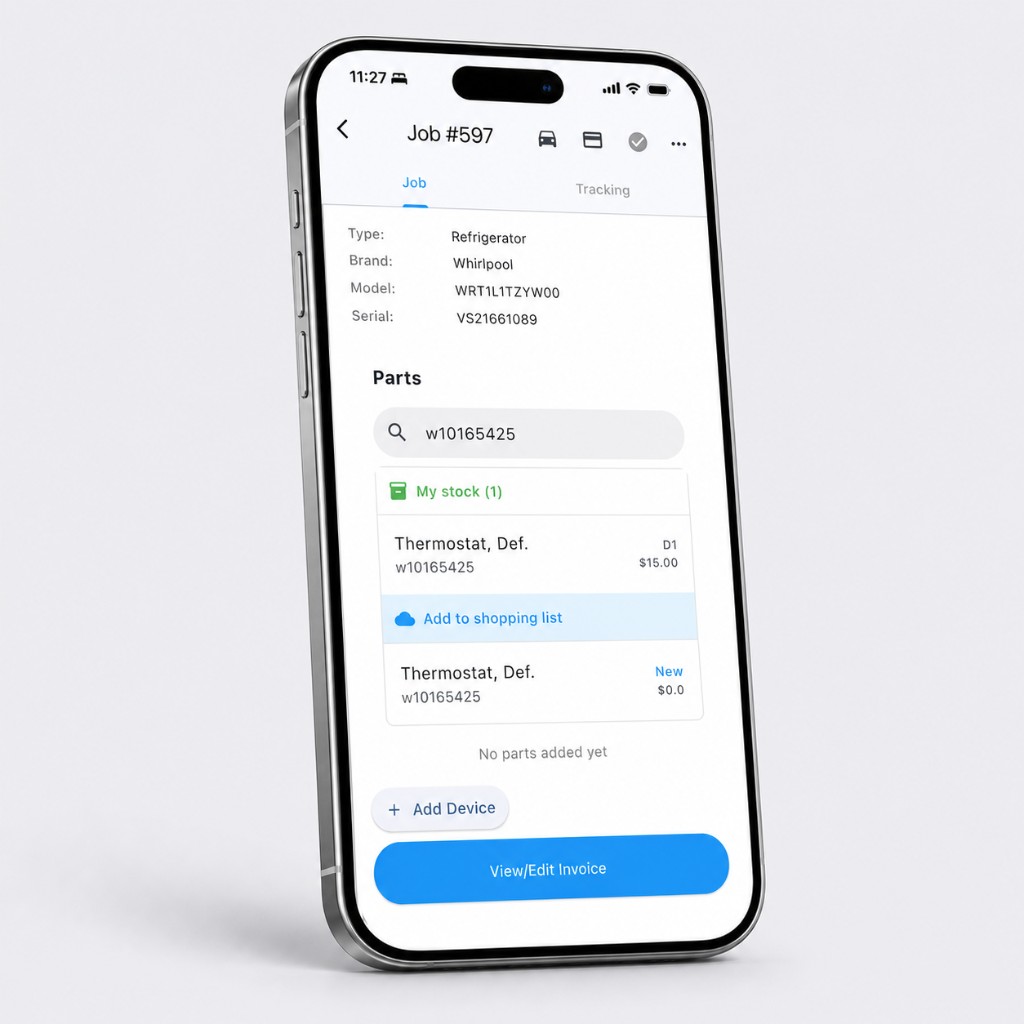
The demo test. Take a job from last month where you fitted a part, have the vendor put that part on one van, then open a new job with the same model number and search for it. If the van stock did not show up in that search while the job was still open on the screen, the demo has answered your question.
Frequently asked questions
What is the best appliance repair software for a small shop?
Our pick is Taskrol, and the owner of Cactus Appliance founded it, so weigh that as you read. It records the appliance on every job, searches parts from the model number and shows whether a van already has one, with a free Solo plan for one technician. If you demo two others alongside it, make them ApplianceOps and Orderry.
Is there free appliance repair software?
Taskrol Solo is free for one technician with unlimited jobs and customers, and it is a plan, not a trial. Housecall Pro, Jobber and ApplianceOps offer 14-day trials, Workiz and Orderry seven days.
Which appliance repair software gets the numbers to a bookkeeper?
Taskrol exports a per-job CSV on Basic and Pro, with revenue, card net received, margin, parts cost, taxes and tips, filtered by period, technician or payment method, which is what our bookkeeper works from. Orderry syncs both ways with QuickBooks and Xero, and ServiceTitan reaches QuickBooks Online and Desktop.
Which appliance repair software has parts lookup by model number?
Taskrol searches the Encompass catalog from the model number on the job and shows that model’s parts diagrams on every plan. Orderry publishes a parts database organized by brand and model, Rossware keys parts to machine type and make, and ApplianceOps returns OEM part numbers from an error code.
Which appliance repair software handles home-warranty dispatch?
Rossware ServiceDesk connects to twelve networks through DispatchLinks, and ApplianceOps parses dispatch emails from AHS, First American, Choice and ServicePower into work orders. In Taskrol a warranty return on your own repair is opened from the completed job with one tap and stays linked to that job.
How do I switch from Housecall Pro or Workiz?
Export the customer list from Housecall Pro, or the jobs report from Workiz, which carries customers and jobs together, and upload the file in Taskrol’s web app under Settings → Database import; Markate exports load the same way. For Jobber and every other system, Taskrol’s support team does the migration from your export.
Bottom line
For a small appliance repair business, one technician to a small team doing retail work, our pick is Taskrol, our own product, and the free Solo plan lets you prove that on your own jobs. For a home-warranty shop, read ApplianceOps and Rossware; for ten or more technicians, ServiceTitan. Taskrol’s plans are at taskrol.com, and the Samsung call that settled the parts question for us is told in the software our appliance repair shop runs on.