On a Samsung dryer, HC (HE) means it ran too hot, tS, tO and tC are the temperature sensor, dC and dF are the door and its switch, bE is a stuck button, 9C1 is supply voltage, AC is the boards not talking, FE is the supply frequency, Et is the control board, Clg or Cg is a clogged vent after the Vent Blockage test, and CL is Child Lock. Check Filter and Check Vent are reminders, not faults. Switch the breaker off for a few minutes, clean the lint filter, check the vent all the way outside, close the door firmly and run a timed cycle. A code that returns is a failed part, and a dryer that overheats should stay off until it is fixed.
This page was written by a working technician at Cactus Appliance in Irvine, from the Samsung dryers we see across Orange County: DV42, DV45 and DV50 electric and gas dryers, the FlexDry models, the compact ventless units and the Bespoke line.
Try this first
- Cut power at the breaker. An electric dryer runs on a double-pole breaker; switch it fully off, wait three minutes, switch it on and start a timed cycle. A lost leg, from a failed breaker pole, a loose wire or a blown fuse on an older panel, lets the drum turn with no heat.
- Clean the lint filter and its slot. Pull the filter, peel off the lint, and vacuum the slot beneath it.
- Check the vent to the outside. Switch the breaker off, then pull the dryer forward, on a gas dryer only as far as the flexible connector allows without strain. Disconnect the duct, switch the breaker on, run air fluff and feel the airflow at the back. The flap on the outside hood should open with the dryer running.
- Close the door firmly. Lint around the door switch or a worn strike makes the dryer think the door is open.
- Check the gas shutoff. On a gas dryer the supply shutoff behind it should be open, handle in line with the pipe. Do not touch anything else on the gas side.
- Dry a smaller load. An overstuffed drum blocks airflow, overheats and stalls the motor on some models.
How Samsung dryers show errors
Models with a display show a two- or three-character code, such as HC, tO or dF. As on Samsung washers, the E suffix became a C suffix around 2015, so HE and HC mean the same thing. The indicators are different: Check Filter comes on with every load on most models as a reminder, Check Vent lights when the Vent Sensor measures a real restriction in the duct, and CL on the display or a padlock icon means Child Lock.
A code stays until the fault clears or the dryer is power cycled. Photograph the code before you reset; the service recall mode that stores it varies by model. A real fault returns within the first few minutes of the next cycle.
Heating and temperature sensor codes
| Code | What it means | What to do |
|---|---|---|
| HC / HE / HC4 | Heating error: the dryer ran hotter than it should, usually from restricted airflow, or on an electric dryer the heater never got hot enough, usually from low voltage. HC4 is a variant on some models; HC2 on a gas dryer is an ignition error. | Clean the lint filter and the vent, then retry. If it returns, the element, a thermostat, the thermistor or the board relay needs testing. |
| tS / tO | Thermistor shorted (tS) or open (tO): the temperature sensor in the airflow gives no usable reading. | Power cycle once. A repeat is the thermistor or its wiring. |
| tC / tE / tC5 / tE5 | Thermistor error: the reading is out of range. tC and tE are the air temperature sensor; tC5 and tE5 are the compressor sensor on the ventless heat pump models. | Power cycle. If it comes back, the sensor needs replacing; a vent so blocked the air overheats can trigger tC too. |
Door, button and motor codes
| Code | What it means | What to do |
|---|---|---|
| dC / dE | Door open: the door switch does not see the door closed, or the door was opened during a cycle. | Close the door firmly and press Start. If the code stays with the door shut, the door switch or its strike has failed. |
| dF / dO | Door circuit error: the door signal is wrong or missing. | Close the door, power cycle, retry. A repeat is the door switch, its harness or the board. |
| bE / bE2 / bC2 | Button error: a panel key is stuck or being read as continuously pressed. | Press each button once, dry the panel, power cycle. If it returns, the panel assembly needs replacing. |
| 3C | Motor error: the board does not see the drum motor running, or the drum is overloaded or jammed. | Take the load out, check that the drum turns freely, retry. A repeat is the motor, its centrifugal switch or the board. |
Power and control board codes
| Code | What it means | What to do |
|---|---|---|
| 9C1 / 9E1 | Power voltage error: the supply is out of range, usually an extension cord, a shared circuit or the wrong supply voltage. One lost 240 V leg gives no heat, not this code. | Switch the double-pole breaker fully off and on, and avoid extension cords. If it repeats on good power, the board needs testing. |
| AC / AE | Communication error between the main board and the panel board. | Power cycle at the breaker. A repeat is a loose connector, a damaged harness or a failed board. |
| FE | Power frequency error: the control sees a line frequency it does not expect, such as from a generator or unstable power. | Run it on normal utility power and power cycle. FE on good power is the main board. |
| Et / EEE | EEPROM error on older models, now grouped by Samsung with the communication errors: the main board cannot read its stored data. | Power cycle once. A repeat means the main board has failed. |
Airflow codes and indicator lights
| Code | What it means | What to do |
|---|---|---|
| Clg / Cg (C8, C9) | Vent Blockage test result on Vent Sensor models: Clg or Cg is a clogged vent, C8 or C80 about 80% blocked, C9 or C90 over 90%. They show only after that test: with the drum empty and the dryer cool, press Power, hold the two buttons your manual names (usually Adjust Time Up and Dry Level) until InS appears, then press Start/Pause. The test runs about two minutes and the result stays about five minutes or until you press Power. | Clean the lint filter and the full vent run to the outside, then rerun the test. A blockage reported with a clean vent is the blower housing or the duct inside the dryer. |
| Check Filter | Not an error: a reminder that comes on with every load on most models, clean filter or not. | Clean the lint filter before each load. If the light stays on through a cycle with a clean filter, the panel needs a look. |
| Check Vent | Not an error code: the Vent Sensor measured a duct roughly 60% or more restricted, during or after a cycle; the Vent Blockage test grades it C8 or C9. | Clean the vent and the exterior hood; with a clean vent it points at the blower housing inside the dryer. |
| Child Lock / CL | Not an error: the panel is locked and ignores presses; the display shows CL, a padlock icon or the words Child Lock. | Hold the buttons marked Child Lock for about three seconds. |
Dryer codes vary by model and production year, and Samsung has used the same letters for different faults on different lines. The owner manual for your model number, on the label inside the door, is the definitive list; only an on-site test confirms the failed part, and we test before we order.
What the common codes turn out to be on a service call
HC: too hot, or no heat at all
Likely causes: a vent so blocked that heat has nowhere to go, a heating element shorted to its housing so it heats continuously, a high-limit thermostat that has failed, a thermistor that drifted, or, on gas models that show HC2, an igniter, a flame sensor or gas valve coils that cut in and out.
Try this first: clean the vent end to end and run a timed cycle. If the cabinet top gets too hot to touch, stop and call.
How we fix it: we measure the element, the high-limit thermostat, the thermal cutoff and the thermistor, clean the blower housing and replace what failed. The gas side is much the same from brand to brand: our LG dryer igniter and flame sensor fix and Maytag dryer gas valve coils repair show the parts involved.
Clg and Check Vent: clogged vent, long dry times
Likely causes: a crushed or kinked foil duct behind the dryer, a lint-packed exterior hood with a stuck flap, a long run with several elbows, a bird nest, or a blower wheel caked in lint inside the dryer.
Try this first: disconnect the duct and run air fluff. Strong airflow at the back and weak airflow at the hood means the duct run is the problem.
How we fix it: we clear the blockage, clean the blower housing and the duct inside the dryer, replace a loaded blower wheel, and show you where the vent run is crushed or packed. One of those jobs is written up in Dryer Making Loud Noise? A Clogged Vent Was Why.
dC and dF: door codes, or a dryer that will not start
Likely causes: a door switch with a burned contact, a worn door strike that no longer reaches the switch, lint packed around the switch, a broken belt, or a thermal fuse blown by a blocked vent; those two give no code. A blown fuse means a dead dryer; a broken belt does too on models with a belt switch, while on the rest the motor runs and the drum stays still.
Try this first: close the door firmly, check that the strike is tight, power cycle. If the drum light works but Start does nothing, call.
How we fix it: we test the door switch, the belt switch where fitted, and the thermal fuse in order and replace the one that failed. A blown thermal fuse gets a vent cleaning with it, or it blows again.
3C, a burning smell or a loud noise
Likely causes: lint in the heater housing or the base, a motor bearing seizing, a blower wheel rubbing its housing, worn drum rollers or an idler pulley, or a sock pulled past the drum seal.
Try this first: stop the dryer and switch the breaker off. A burning smell with lint inside the cabinet is not a wait-and-see fault.
How we fix it: we clean the base and the heater housing, then replace the motor, the blower wheel or the rollers as needed. Our Samsung dryer burning smell repair was exactly this: the motor and the blower.
Stay safe. Switch the breaker off before you pull the dryer out or open anything; an electric dryer carries 240 V. Lint is fuel: never run a dryer that smells of burning, and never bypass the thermal fuse or the door switch. On a gas dryer leave the burner, the valve coils and the gas line to a technician, and replace plastic or foil duct with rigid metal.
When a code means a part has failed
Our visit is $79 for the trip and the diagnosis, and it comes off the repair when you approve the written quote. The quote lists parts and labor and does not change once you have it. Common dryer parts such as thermistors, thermal fuses and door switches are usually on the van; others, such as a motor or a control board, come from local distributors, usually the next business day. Parts and labor are warranted, and if the same fault returns inside 90 days there is no service-call fee on the return visit.
Dryer repairs we have written up
- Samsung Dryer Burning Smell: Motor and Blower Fix (August 2026), Orange County
- Dryer Making Loud Noise? A Clogged Vent Was Why (September 2026), Orange County
- Why Is My Maytag Dryer Not Heating? (October 2026), Orange County
- LG Dryer Not Heating: Igniter and Flame Sensor Fix (July 2026), Orange County
Samsung dryer error code FAQ
How do I reset a Samsung dryer?
Samsung dryers have no reset button, so the breaker is the reset: fully off, three minutes, back on, then a timed cycle. A code that comes straight back is a part, not a glitch.
What does HC mean on a Samsung dryer?
HC is a heating error: the dryer ran hotter than it should, most often because the vent is blocked, or the heater circuit reads wrong. Clean the filter and the vent; if HC returns, the element, a thermostat or the thermistor needs testing.
Why is the Check Filter light on?
On most Samsung dryers Check Filter comes on with every load as a reminder, whether or not the filter is clean, and is not an error. Clean the lint filter before each load; if the light stays on through a cycle with a clean filter, the control panel needs a look.
What does Clg or Check Vent mean on a Samsung dryer?
Clg, Cg and the Check Vent indicator mean the Vent Sensor measured restricted airflow; CL by itself is Child Lock. Clean the lint filter and the whole vent to the outside; if it shows again with a clean vent, the blower housing inside the dryer is usually packed with lint.
Can I keep using the dryer with an error code on it?
With dC, dF, bE or Check Filter you can usually run another load after the checks above. With HC, tS, tO, a burning smell or a cabinet that is hot to the touch, switch the breaker off and call; an overheating dryer is a fire risk.
How much does it cost to fix a Samsung dryer error code?
The visit is $79 and comes off the repair. A thermistor, a thermal fuse or a door switch is the affordable end, a heating element or an igniter the middle, a motor or a control board the expensive end; the written quote comes before the work.
Do you repair Samsung dryers in Orange County?
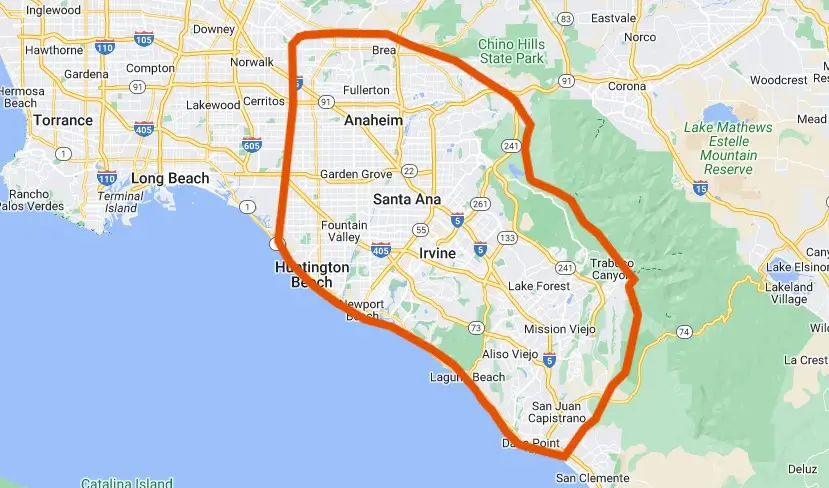
Yes, electric and gas. Cactus Appliance is based in Irvine and covers all of Orange County, including Tustin, Lake Forest, Mission Viejo, Huntington Beach and Anaheim, same day, seven days a week.
Related guides and services
Recent Samsung washer and dryer repairs
More error code guides
Samsung refrigerator error codes · Samsung oven and range error codes · LG washer error codes · Whirlpool and Maytag washer error codes